What Is a Link in Bio? How It Works and What to Put on Yours
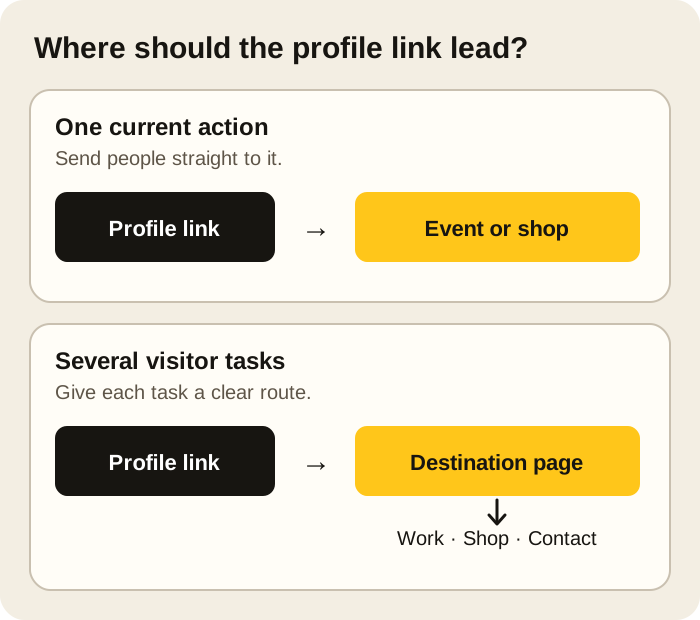
A link in bio is a clickable address on a social profile. When a post says “link in bio,” it asks you to open that profile and follow the link. The address might lead straight to a shop, a video or an event page. It might lead to a small page that collects several destinations.
The profile link takes someone to an address; the destination page helps them find what they came for. You can use a website you already own for either job. A separate bio page becomes useful when one link needs to serve people looking for different things.
Where does someone find the link?
Usually, they open your profile and look near the bio or profile details. The exact control varies by service and account. Instagram documents website links in its mobile profile editor. YouTube calls them channel profile links. TikTok documents a website-link option, but availability depends on the account. Check what your own profile lets you add before telling viewers to tap a website link.
You do not need to explain these settings on the destination page. Put the address in the supported profile field, then open your profile as a visitor and follow it once. That short test catches an old URL, a typo or a page that looks fine in the editor but is awkward on a phone.
Do you need a page behind it?
If you are promoting one thing, a direct link may be best. Someone announcing a single event can send visitors straight to the ticket page. An artist taking commissions and selling a new collection has two different visitor tasks; sending both groups to a shop makes the commission path harder to find.
A bio page earns its place when it helps someone choose. It can show a current priority, a little of the work itself, and a few clear routes onward. It also lets you change the emphasis without changing the profile URL every time a market, release or booking window ends.
Before adding another button, ask: Who is this for, and what will they find after the tap? “Spring collection” tells a visitor more than “Shop.” “Ask about a commission” is clearer than “Contact.” A page full of vague labels makes the visitor do the sorting you could have done for them.
What belongs on the page?
Start with the question a new visitor is likely to have. They may have arrived from one photo or video and know very little about you.
- Name the person or business. Add a short line that says what you make or do. A visitor should be able to tell they landed in the right place.
- Put the current reason to visit first. This could be a collection, a new release, today's menu, open appointments or an upcoming event. Give a date when it changes the decision.
- Keep a few lasting routes close by. Selected work, services, an existing shop, a newsletter or a contact method can remain useful after this week's promotion ends.
- Explain an action before sending someone away. Say whether a button opens a shop, an external booking service, a form or a full portfolio. Do not call an enquiry a confirmed booking.
That order should change with the work. A café visitor may need the menu, opening hours and address before an Instagram link. A musician who has just released a song may lead with the music, then put show dates and press contact nearby. The first screen should answer the question that brought the visitor there.
Two possible arrangements
These are illustrative examples, not customer pages or reported results.
| Page | What appears first | What can follow |
|---|---|---|
| Ceramic artist | Name, image of the current collection and a clearly labelled link to the existing shop | Saturday market details, selected older work and a commission enquiry |
| Neighbourhood café | Today's menu, hours and address | Directions, a reservation link if the café uses one, and contact details |
Neither page needs every social account at the top. If visitors want to buy, visit or get in touch, give those actions enough room to be noticed.
Build it, then follow it like a visitor
Write down the main action before you choose a template or arrange links. Add only the material that helps someone understand or complete that action. If you need three paragraphs to explain a button, the page may need a short description or a photo beside it.
Open the finished page on a phone. Read the first screen without scrolling. Are the name and current action clear? Can you tap every link comfortably? Do the labels match the destinations? Then visit the social profile and follow its link through to the same page. Send the profile, not the editor preview, to someone who has not seen it before and ask what they would tap first.
Keep the page current. When the market has passed or appointments are full, remove or replace that action. An expired event at the top makes the rest of the page feel unattended.
Is this different from a one-page website?
A simple bio page can be a short list of links. A one-page website usually does more explaining before someone leaves: selected work, images, service details, location or a way to ask a question. The same address can serve both purposes. What matters is how much a visitor needs to understand before the next click.
If you want the page to show the work alongside the actions, Pinli's link-in-bio builder lets you arrange content as blocks and edit the phone layout separately. The creator page shows how that can support a fuller introduction. You can compare the current Pinli plans if that approach fits what you need.
A couple of common questions
What if my social profile lets me add several links?
You can use those fields when the choices are simple and their labels make sense on their own. A destination page gives you room to explain the choices and change their order as your work changes. You do not need a separate tool if your own website already does that job.
Can I use the same page on several profiles?
Yes, if visitors from each profile need roughly the same introduction and routes. If one campaign promises something specific, consider linking straight to that item instead. Check every profile after changing its link; a correct page cannot help if people are sent to an old address.